91 Tools, One Server: How We Use MCP to Run Sales, Invoicing, and Inventory From a Single AI Interface
Six modules. Four backend types. Two transports. One binary. Here's how we wired our entire operations stack into a single MCP server.

Mar 13, 2026
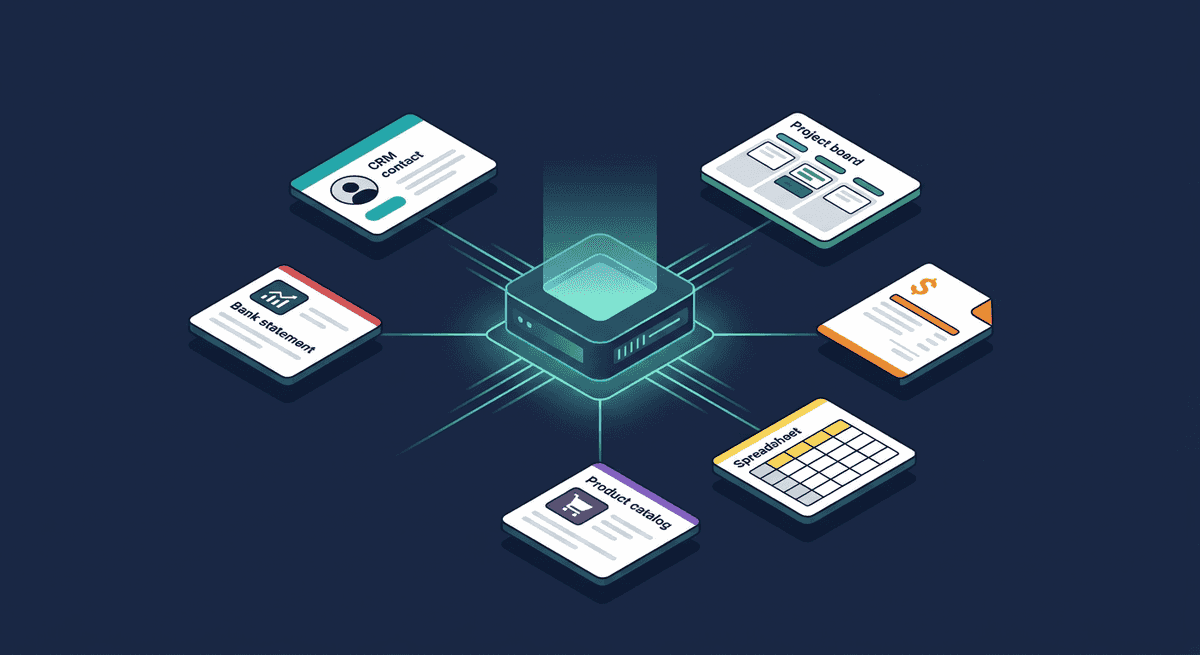
Sales tools are everywhere. Project trackers are everywhere. Invoicing software, product databases, bank statement parsers — all everywhere, all separate, all requiring a different tab, a different login, a different mental model.
We got tired of context-switching. So we built one MCP server that connects all of them — and now our AI assistants handle CRM updates, invoice generation, task management, and product lookups through a single conversation.
This post breaks down how we structured it, what each module does, and what we learned running 91 tools across 6 domains in production.
What Is MCP and Why We Use It
Model Context Protocol is a standard for connecting AI models to external tools and data. Instead of building custom integrations for every AI client (Claude Desktop, Claude Code, a Telegram bot, a web agent), you build one MCP server that exposes tools — and any MCP-compatible client can call them.
Think of it as a universal adapter between AI and your business systems. The AI says "search contacts where status is discussing," the MCP server translates that to a PostgreSQL query, and returns structured results. The AI never touches your database directly. Your database never needs to know about AI.
We run ours over two transports: stdio for Claude Desktop (local, no network) and Streamable HTTP for remote clients like Claude Code, our Telegram bot, and classifier service. Same server, same tools, different access patterns.
The Architecture: Modules, Not Monoliths
The server is built around a simple abstraction: modules. Each module owns a domain — CRM, project management, invoicing — and exposes tools for that domain. Modules are independent. They don't talk to each other. They share nothing except the interface they implement:
type Module interface {
    Name() string
    GetTools() []Tool
    CallTool(ctx context.Context, toolName string, arguments map[string]any) (*ToolResult, error)
    Start(ctx context.Context) error
    Stop(ctx context.Context) error
}
At startup, the server loads whichever modules are enabled via environment variables. A tool registry indexes every tool by name across all modules. When a tool call comes in, the router looks up which module owns it and dispatches. The AI client sees a flat list of 91 tools — it doesn't need to know about modules at all.
This matters because modules have completely different backends. Some hit REST APIs. Some query PostgreSQL. Some load XLSX files into memory. The module boundary absorbs that complexity. Adding a new data source means writing a new module, not touching any existing code.
Architecture overview
What Each Module Does
CRM — 43 tools
The heaviest module. Connects directly to our LinkedIn outreach CRM's PostgreSQL database — the same database the web app reads and writes. Contacts, interactions, deals, follow-ups, workflows, batches, suggested messages, coaching.
This is the module our Telegram bot and AI classifier use most. A sales rep asks the bot "how is Marcelo doing?" and the CRM module handles the full cycle: search contact by name, pull recent interactions, check pending follow-ups, return a summary the AI formats into a chat message.
Write tools support dry-run mode — the AI can preview what a create or update would do without persisting anything. Our classifier uses this to detect write operations and ask for user confirmation before committing. The response includes the full object that would be created, so the user sees exactly what they're approving.
Key design decision: multi-tenant authentication. The HTTP transport validates API keys against the CRM database. Each key maps to a user and organization. Every query is automatically scoped to the caller's org — the AI can't accidentally cross tenant boundaries, even if it tries.
Linear — 6 tools
Project and task management via Linear's GraphQL API. Create tasks, list projects, assign to team members, track sprints. We use this for engineering work — the same AI assistant that updates CRM contacts can also create a bug ticket when a rep reports a broken feature.
The module does a health check at startup to verify API connectivity. If the Linear API is unreachable, the server refuses to start rather than silently failing tool calls later. Fail loud, fail early.
ERP Connector — 23 tools
A client's time-management and invoicing ERP. Members, subscriptions, attendance tracking, and a full billing pipeline — generate invoices, add/remove line items, transition statuses (draft to sent to paid), batch operations across accounts.
This is the module that convinced us the multi-module approach was right. An ERP's domain is completely unrelated to CRM or project management. But from the AI's perspective, "generate January invoices for the afternoon program" is just another tool call. The module translates it to the right API sequence — authenticate, fetch subscriptions, calculate amounts, create invoice with line items — and returns a summary.
Three authentication strategies, chosen by configuration: static API key (preferred), per-request key forwarding (for proxy setups), or legacy username/password. The module picks the right one at startup without the AI needing to care.
Google Sheets — 7 tools
Product catalog lookups against a Google Sheets spreadsheet. Search by producer, category, region, or free text across all columns. Fetch specific rows or batches.
This module was our original prototype — before we had a proper database, all our reference data lived in a spreadsheet. The module works with or without a Google API key: with a key, it uses the Sheets API; without one, it falls back to CSV export (works for public sheets). Zero-infrastructure option for getting started.
Product Database — 6 tools
Similar to Google Sheets but backed by a local XLSX file — an industry reference database with tens of thousands of product entries. Loaded into memory at startup for millisecond lookups. Search by producer, region, or full text.
We built this as a separate module from Google Sheets because the data source is fundamentally different (local file vs. remote API), even though the tool interface is nearly identical. The module boundary makes this invisible to the AI — both expose "search products" tools with the same result shape.
Bank Statements — 6 tools
Local XLSX bank statement analysis. Search transactions by wording, amount, date, or reference. List categories. Fetch specific rows.
Read-only, no external API, no authentication. The simplest module — but it lets the AI answer "how much did we spend on software subscriptions last quarter?" by searching real bank data, not by guessing.
What We Learned Running This in Production
1. Flat tool lists work better than hierarchies
We considered namespacing tools by module — crm.search_contacts, linear.create_task. We dropped it. AI models handle flat lists of well-named tools better than nested structures. crm_search_contacts is unambiguous enough. The model picks the right tool from 91 options with near-perfect accuracy, as long as each tool has a clear one-line description and well-typed parameters.
2. Dry-run changes everything for trust
Dry-run confirmation flow
AI calls tool
dry_run: true
Server previews
No data written
User reviews
Confirm or cancel
AI commits
dry_run: false
The biggest friction with AI-powered write operations isn't accuracy — it's trust. Users don't want an AI creating contacts or generating invoices without seeing what it's about to do. Dry-run mode solves this completely. The AI calls the tool with dry_run: true, shows the user the preview, and only commits after explicit confirmation. Our Telegram bot implements this as an inline keyboard: "Create this contact? [Confirm] [Cancel]" with a 5-minute timeout.
3. Health checks at startup prevent silent failures
Every module that connects to an external service (Linear API, ERP API) runs a health check before the server starts accepting requests. If the check fails, the server logs the error with a hint ("Verify ERP_BASE_URL and ERP_API_KEY") and exits. This sounds obvious, but the alternative — tools that return cryptic 401 errors mid-conversation — is far worse.
4. One database connection, multiple consumers
The CRM module and the authentication middleware share the same PostgreSQL connection pool. We open it once in a shared initialization function and pass it to both. This avoids duplicate connections and ensures migrations run exactly once. The module owns the close lifecycle.
5. Modules should never talk to each other
Cross-module calls create hidden dependencies and make testing painful. If the AI needs data from CRM and Linear in the same conversation, it calls both tools separately and synthesizes the results itself. The AI is the integration layer — not the server.
6. The same server serves very different clients
Our stdio transport serves Claude Desktop — local, single-user, no auth needed. Our HTTP transport serves Claude Code, Cursor, the Telegram bot, and the classifier — remote, multi-user, API-key authenticated. Same binary, same modules, same tools. The transport layer is the only thing that changes. This saved us from building and maintaining two separate tool servers.
The Numbers
| Module | Tools | Backend | Auth |
|---|---|---|---|
| CRM | 43 | PostgreSQL | API key (multi-tenant) |
| ERP Connector | 23 | REST API | API key / password |
| Google Sheets | 7 | Sheets API / CSV | API key (optional) |
| Linear | 6 | GraphQL API | API key |
| Product Database | 6 | Local XLSX | None |
| Bank Statements | 6 | Local XLSX | None |
| Total | 91 | — | — |
Tool distribution by module
91 tools total across 6 modules
Six modules. Four different backend types (SQL, REST, GraphQL, local file). Three authentication strategies. Two transport protocols. One binary.
Adding a New Module
The module interface is intentionally minimal. A new module needs:
- A constructor that takes its dependencies (logger, client, config)
GetTools()returning tool definitions with names, descriptions, and JSON schemasCallTool()dispatching by tool name to handler functions- Optional
Start()/Stop()for lifecycle management
Registration is one function call in modules.go. The tool registry, router, and transport layer pick it up automatically. No changes to any existing module.
We've gone from 1 module to 6 over the past year. Each one took a day or two to build, including the service client. The module pattern makes this predictable rather than scary.
Connecting Clients: Claude Code vs. Claude Desktop
Not all MCP clients connect the same way. This is worth understanding if you're building your own server, because it affects how you handle authentication and transport.
Claude Code and Cursor — direct HTTP
Claude Code and Cursor support Streamable HTTP natively. They connect directly to your server's HTTP endpoint — no proxy, no subprocess. This is the simplest setup:
{
  "mcpServers": {
    "crm": {
      "type": "streamable-http",
      "url": "https://your-mcp-server.example.com/mcp",
      "headers": {
        "Authorization": "Bearer your_api_key_here"
      }
    }
  }
}
For Claude Code, this goes in .claude/settings.json (global) or .mcp.json (per-project). For Cursor, it's in .cursor/mcp.json. The key difference from Claude Desktop: the client handles HTTP directly, so the Authorization header travels with every request. Your server validates it, resolves the user and org, and scopes all queries accordingly.
Claude Desktop — stdio proxy
Claude Desktop only speaks stdio — it launches a subprocess and communicates over stdin/stdout. If your server runs remotely over HTTP, you need a thin proxy binary that bridges the two:
{
  "mcpServers": {
    "crm": {
      "command": "/path/to/mcp-proxy",
      "env": {
        "CRM_URL": "https://your-mcp-server.example.com",
        "CRM_API_KEY": "your_api_key_here"
      }
    }
  }
}
The proxy reads JSON-RPC from stdin, forwards it to your HTTP endpoint with the API key, and writes the response to stdout. It's ~100 lines of Go. On macOS, you'll need to remove the quarantine flag after downloading: xattr -d com.apple.quarantine mcp-proxy.
This goes in ~/Library/Application Support/Claude/claude_desktop_config.json on macOS.
What this means in practice
The transport difference is invisible to your modules — they never see how the request arrived. But it matters for deployment:
- HTTP clients (Claude Code, Cursor, Telegram bot) connect directly. Auth is a header. You can add new clients without touching your server.
- Stdio clients (Claude Desktop) need a proxy binary per platform. You build it once, ship binaries for macOS/Linux/Windows, and forget about it.
We ship pre-built proxy binaries for darwin-arm64, darwin-amd64, linux-amd64, and windows-amd64. Most of our team uses Claude Code day-to-day — the HTTP path with zero setup friction.
Building Your Own: The Stack
If you want to build something similar, here's what we used:
The server is written in Go using the official Model Context Protocol Go SDK (github.com/modelcontextprotocol/go-sdk). The SDK handles JSON-RPC framing, tool schema serialization, and transport negotiation — you write modules, it handles the protocol.
A minimal MCP server with one tool looks like this:
package main

import (
    "context"
    gomcp "github.com/modelcontextprotocol/go-sdk/server"
)

func main() {
    s := gomcp.NewServer(
        &gomcp.Implementation{Name: "my-server", Version: "1.0.0"},
        nil,
    )

    // Register a tool
    s.AddTool(gomcp.Tool{
        Name:        "hello",
        Description: "Say hello",
    }, func(ctx context.Context, args map[string]any) (*gomcp.ToolResult, error) {
        return gomcp.NewToolResultText("Hello from MCP!"), nil
    })

    // Start with stdio transport
    s.Run(context.Background(), &gomcp.StdioTransport{})
}
For HTTP, swap the transport to StreamableHTTPHandler and mount it on your HTTP router. We use the same binary for both — an environment variable decides which transport to activate.
The proxy binary for Claude Desktop is equally straightforward: read stdin, POST to the HTTP endpoint, write stdout. The Go SDK's StdioTransport does most of the work.
Why Not Separate Servers?
We considered running one MCP server per domain — a CRM server, a Linear server, an ERP server. The arguments against:
- Operational overhead. Six servers to deploy, monitor, and keep running vs. one. For a small team, this matters more than architectural purity.
- Shared auth. The CRM database stores API keys for all modules. With separate servers, each one needs its own auth solution or a shared auth service — which is just another server to maintain.
- Client simplicity. Claude Code, Claude Desktop, Cursor, and the Telegram bot each connect to one endpoint. One connection, one tool list, one failure mode. Adding a new module doesn't require reconfiguring every client.
- Resource efficiency. One process, one connection pool, one logger. The modules that load XLSX files into memory share the process's memory budget rather than each claiming their own.
The tradeoff: if one module crashes, it could take down the others. In practice, this hasn't happened — each module's CallTool catches panics internally. And if the whole server goes down, a single restart brings everything back.
What's Next (and What to Watch Out For)
The pattern is easy to extend — new module, same interface, same server. The AI gets new capabilities without any change to how it reasons about existing ones. That's the upside.
But there's a real cost to watch. Every MCP tool definition — name, description, parameter schema — gets loaded into the model's context on each call. At 91 tools, that's a meaningful chunk of tokens before the conversation even starts. Add a seventh module with 15 tools and you're paying for 106 tool definitions in every single request, whether the user needs them or not.
We're not at the pain point yet, but we can see it coming. The options: per-client tool filtering (the Telegram bot only loads CRM + Linear tools, Claude Desktop gets everything), lazy tool registration (modules advertise categories, tool schemas load on first use), or simply being disciplined about which modules each transport exposes. The worst outcome would be adding tools nobody uses and silently inflating every API call.
More tools is not always better. Each one should earn its token cost.
The Bottom Line
MCP isn't magic — it's plumbing. But good plumbing means your AI assistants can do real work across real systems, not just answer questions. The module pattern keeps each domain clean and independent while giving the AI a unified interface to everything.
If you're stitching together multiple business tools with AI, consider whether a single multi-module MCP server would simplify your stack. For us, going from "six different admin panels" to "one conversation" was the unlock — just keep an eye on the token bill as the tool list grows.
Built with Go and the official MCP Go SDK, deployed as a single binary. Serving Claude Code, Claude Desktop, Cursor, a Telegram bot, and a classifier — all from the same 91 tools.