Beyond Text: Solving Real-World Document Understanding with Vision LLMs
What if a single multimodal vision model could understand any document thrown at it? Here's what we learned building production-grade image recognition across wine labels, financial documents, and handwritten schedules.

Feb 24, 2026
Every business runs on documents — invoices, payslips, product labels, attendance sheets. Most of them arrive as photos, scanned PDFs, or printouts with handwritten notes. Extracting structured data from these has traditionally required expensive, brittle OCR pipelines that break the moment a layout changes.
We took a different path. Instead of engineering templates for each document type, we asked: what if a single multimodal vision model could understand any document thrown at it?
Here's what we learned building production-grade image recognition across wine labels, financial documents, and handwritten schedules.
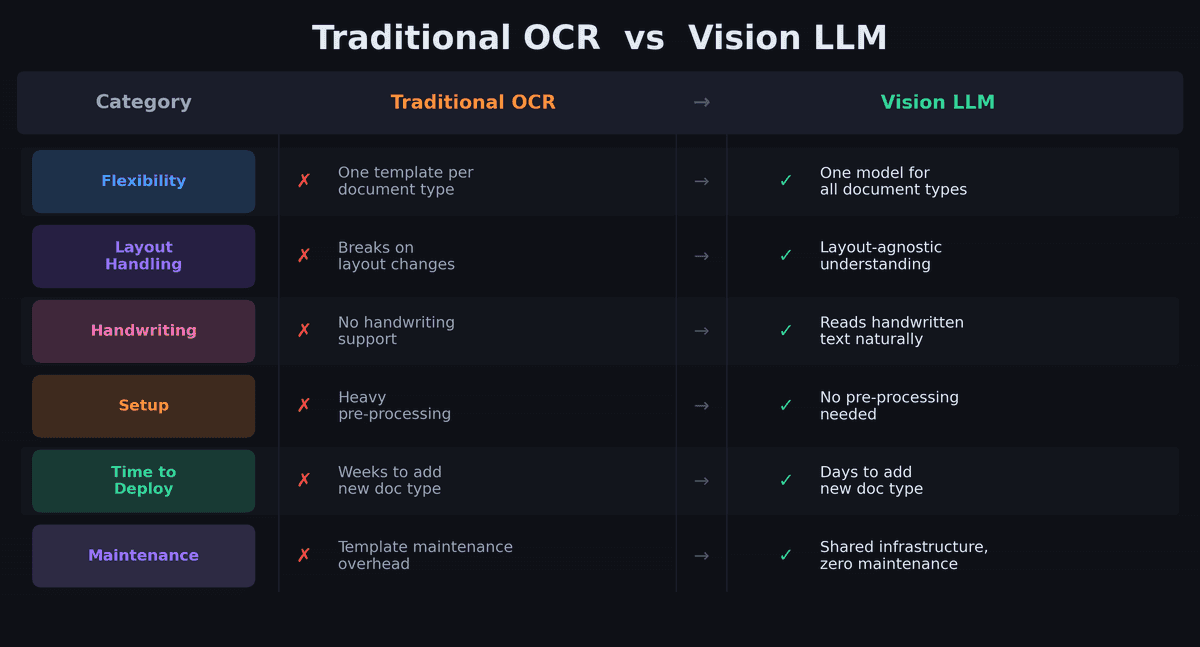
Challenge #1: Every Document Looks Different
Wine labels come in thousands of designs. French payslips vary wildly across payroll providers. Childcare schedules mix printed tables with handwritten annotations. A traditional OCR approach would require a separate template for each layout — and constant maintenance as formats change.
Our approach: We define a structured schema for each document type using DSPy signatures — essentially telling the vision model what to extract, not where to find it. The model understands layout and context on its own. A wine label prompt specifies "extract winery, designation, vintage, region" without needing to know if the vintage is printed at the top, bottom, or on a neck label.
This means adding a new document type is a matter of writing a new prompt and output schema — not building a new pipeline.
Challenge #2: Messy Real-World Input
Production documents are rarely clean. We regularly process:
- Wine bottles photographed at angles, in low light, with reflections on glass
- Payslips scanned at odd angles with stamps, signatures, and handwritten notes overlaid
- Attendance sheets where half the entries are handwritten corrections over printed text
- Multi-page PDFs mixing tables, text blocks, and images
Classical OCR chokes on these. Vision LLMs handle them naturally — they understand visual context the way a human reader would. A handwritten "X 17h45" next to a child's name on a schedule is just as readable to the model as a neatly printed table cell.
For PDFs specifically, we process them natively rather than converting to images first. This preserves text fidelity and table structure that would otherwise be lost in rasterization.
Challenge #3: How do you get reliable structured output from vision LLMs?
Vision models are great at understanding documents but inconsistent at formatting their answers. In production, we found that 5–10% of responses arrive with issues:
- JSON wrapped in markdown code fences
- Literal newlines inside string values
- Conversational preamble before the actual data
- Occasional hallucinated fields
Our solution: A multi-stage JSON recovery pipeline that handles each failure mode in sequence:
Direct JSON parse
      ↓ (fails?)
Strip markdown fences + retry
      ↓ (fails?)
Escape literal newlines + retry
      ↓ (fails?)
Extract outermost { } braces + retry
This takes us from ~90% first-pass parse success to 99%+ after recovery. The difference between "works in demos" and "works in production."
Challenge #4: How do vision LLMs perform at scale?
Vision model inference is inherently slower than text-only calls — typically 3–10 seconds per document. When processing batches of hundreds of documents, naive sequential processing is unacceptable.
Our approach:
- Async-first architecture — every vision call runs off the main event loop with strict 60-second timeouts
- Concurrent batch processing — semaphore-controlled parallelism prevents API rate-limit saturation while maximizing throughput
- Exponential-backoff retries — transient failures are handled automatically without manual intervention
- Parallel post-processing — for wine labels, database matching for multiple detected wines runs concurrently after extraction
The result: a batch of 100 documents processes in minutes, not hours.
The Architecture Advantage: One Pattern, Many Document Types
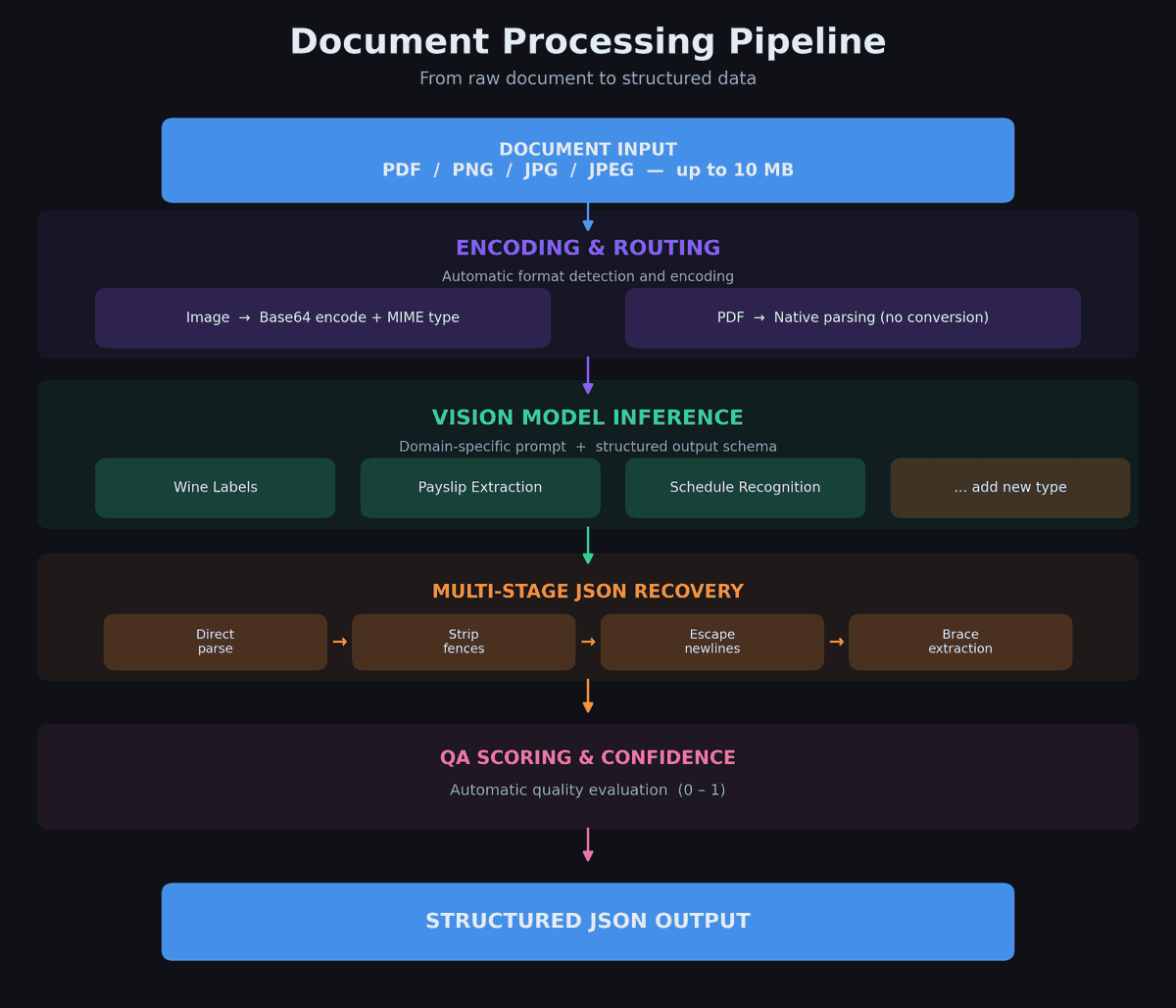
The key insight behind our system is that all vision-based extraction follows the same pattern:
Input (image/PDF) → Encode → Domain prompt + schema → Vision model → JSON recovery → QA scoring → Structured output
The only thing that changes between document types is the prompt and the output schema. The encoding, model routing, JSON recovery, QA evaluation, async execution, and error handling are all shared infrastructure.
This means going from "we need to read a new document type" to "it's in production" takes days, not months. The heavy lifting — robust parsing, confidence scoring, batch processing, timeout handling — is already solved.
The Bottom Line
Traditional OCR is a game of templates and edge cases. Vision LLMs flip the approach: instead of telling the system how to read each document, you tell it what to extract and let the model figure out the rest.
The challenges are real — inconsistent output formatting, variable input quality, and performance at scale. But each of these has a systematic solution that generalizes across document types.
If you're maintaining separate OCR pipelines for different document formats, or manually processing documents that arrive as photos and scans, the multimodal LLM approach is worth evaluating. The cost-per-call is dropping fast, the accuracy on messy real-world inputs is already production-grade, and the time-to-deploy for new document types is dramatically shorter than building yet another template-based pipeline.
Want to see how we optimize LLM costs in production? Check out our cost-efficiency benchmarks and model comparison results.
Turning documents like these into clean, structured records is exactly what our AI data onboarding does.